Multiple World Clock & Time zone Overlay for Windows 11/10
This website offers a Free to try Software Utility for Windows titled Desktop Clock Software Utility for Windows 11, Windows 10, etc. This Desktop Clock Utility allows you to have single or multiple Digital Clocks on Desktop with configurable parameters. Free Trial of the software allows you to fully evaluate the Desktop Clock Software and see if it can be useful for your purpose.
Get Your Free Desktop Clock Trial
Download the Windows clock installer to try the application on your Windows 11 or Windows 10 computer today. Once the trial period expires, a 6-month single-computer license is available for USD 7.89. This evaluation version provides unrestricted access to all features, allowing you to test its capabilities completely before purchasing.
Features of Desktop Clock Software
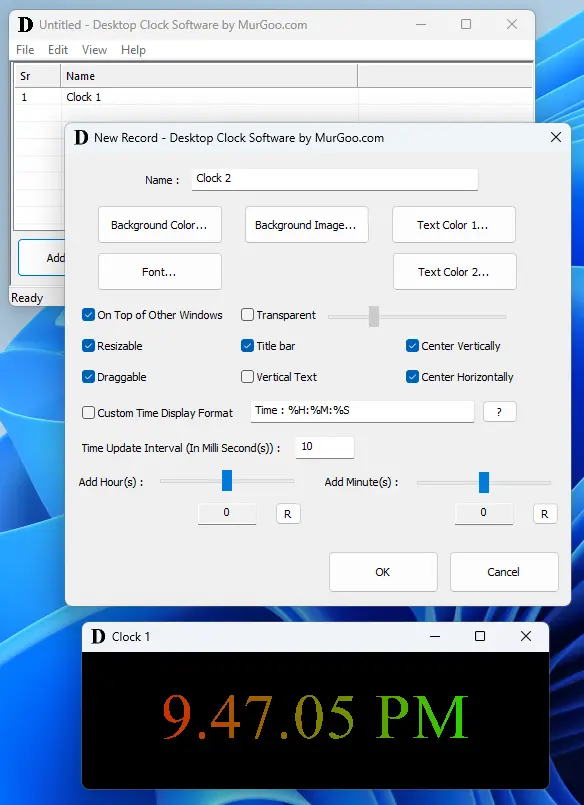
The Desktop Clock Software allows you to have single or multiple Digital Clocks on your Windows 11 or Windows 10 Computer. The Application is packaged as a 32 bit application and works fine on 64 bit computer as well. You can view screenshot of this Desktop Clock Software captured on a Windows 11 computer displaying various configurable features.
- Configurable Font, Text Color, Background Color and Background Image for each Desktop Clock.
- The Desktop Clock created can be dragged to any appropriate Screen Location.
- Resizing of the Desktop Clock can be used to Resize the Clock Window for appropriate display of Standard or Custom Clock Display Window.
- Time Display of Desktop Clock can be customized to include additional text or custom time format.
- You can offset Time Display (from current System Time) of this Desktop Clock Software with configurable number of Hours and Minutes.
- All the configurable parameters can be saved in a data file which can be loaded at a later date / time and display single or multiple Clocks as saved.
- The Background Color of the Clock can be made transparent and make the Clock display only Text.
- Once you have configured Desktop Clocks, you can Hide the Main Application Window to System Tray or even Minimize the Software. To Launch the Main Window of Desktop Clock Software, you can double click on the Application's System Tray Icon or Right Click on the Icon to view Manu containing the available options.
- Few parameters of the Desktop Clock can be configured by doing a Right Click on the Clock and then clicking on appropriate menu item from the context menu.
Having Single or Multiple Desktop Clocks can be really easy and handy with this Free to Download and try Application Utility for Windows 11 or Windows 10. Do have a look at the Screenshot provided above or review the list of features enumerated above. In case you would like to suggest a related feature, please do write to Support@MurGoo.com. This Desktop Clock Application can display Clock(s) in Configurable Window or as a Transparent Overlay like Screen Overlay Software which can display Text or Image Overlays without stopping Mouse Clicks navigating to Application beneath it.